Case study
Building one bill for three revenue streams on a ticking clock
A gaming café sells time, toys and food, often to the same guest in the same visit. Ninja Gaming Cafe needed gaming cafe billing software that could bill all of it accurately, warn staff before a session ran over, and show the owner exactly where the money came from.
About the client
Ninja Gaming Cafe is a gaming café in Pondicherry (Puducherry) that combines console and PC game stations with an RC toy play zone and a food and snacks counter. Guests might book an hour on a console, add a snack combo, let the kids run an RC car, and settle the bill with a mix of cash and UPI.
The venue is run from a single front desk. Owners or managers oversee the catalogue, reports and settings. Counter staff run live bills through the day.
The problem
A generic cash register cannot bill time. A venue like this is really three businesses sharing one counter, and the usual workarounds — paper tickets, notebooks, a stopwatch app — leak money and attention.
-
01
Three kinds of billing on one guest
Timed console sessions, timed RC sessions and food each price differently. Separate tickets meant a guest might pay three times, and the owner could never see the full picture of a visit.
-
02
Sessions that run over, or get missed
Staff are busy, and session end times are easy to miss. Overruns and awkward “your time is up” conversations were a constant friction.
-
03
Stations getting double-booked
Without a live view of what is occupied, the same console could be promised to two guests.
-
04
Combos and discounts that were hard to track
Bundles like game plus snack are popular. Without proper records, nobody could see what was actually saved or sold at list price.
-
05
Loyalty and tax living in notebooks
Repeat customers, referral rewards and GST needed to be applied consistently at checkout, not remembered.
-
06
No clear numbers for the owner
Which games earn the most? What is the food margin? How much comes through UPI versus cash? Which staff member closes the most bills? None of this was easy to answer.
What we built
The brief: one custom web application that runs the whole floor from the front desk, and tells the owner the truth at the end of the day.
The front desk
-
01
One live bill per guest, three revenue lines
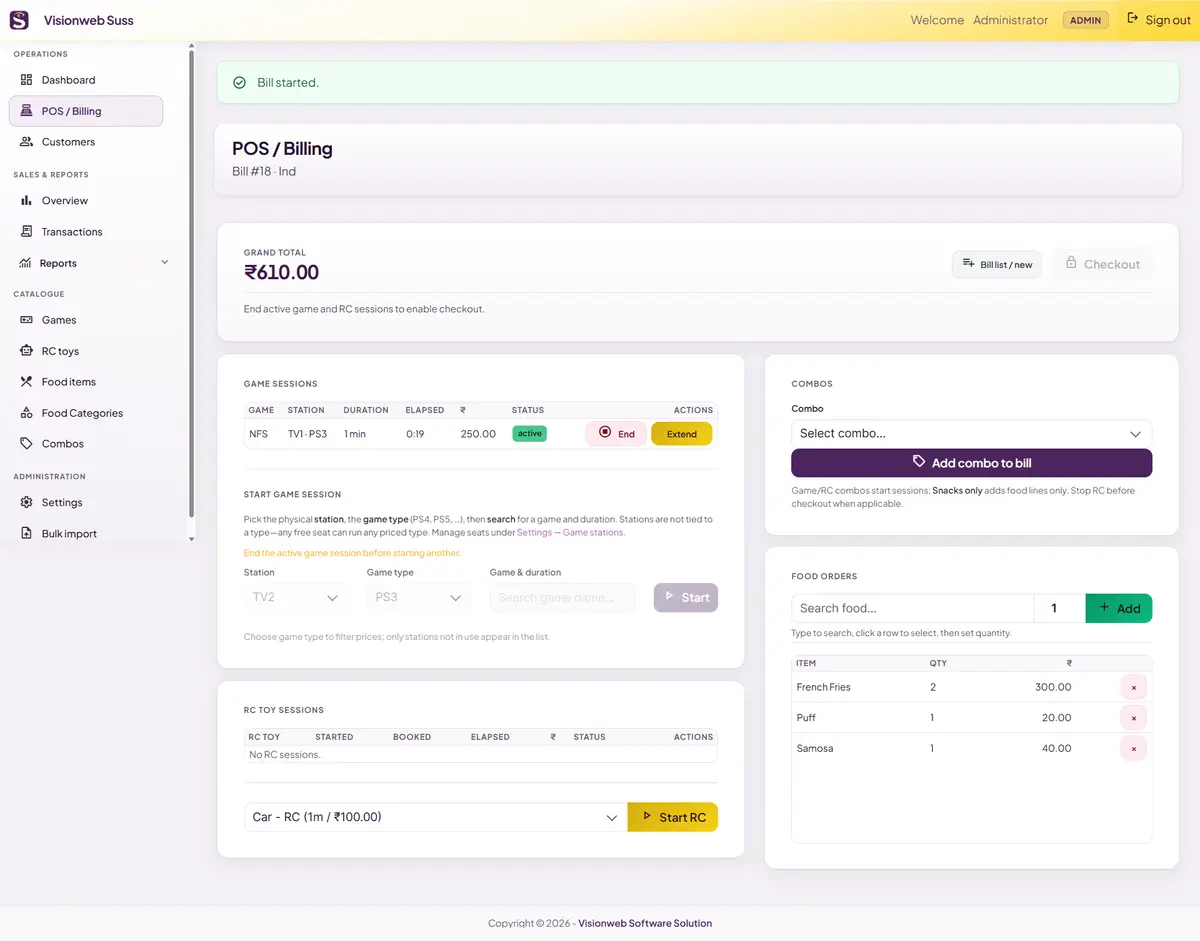
Search a customer by name or phone, or start a walk-in bill. A single bill holds game sessions, RC toy sessions, food lines and combos, with a running total that updates as things are added. Most actions update without reloading the page, so the desk never stops mid-rush.
-
02
Sessions priced from the catalogue, not typed in
Game and duration come from each game’s price list per station type, for example console or PC. Staff pick, the system prices. Sessions can be extended with another priced block, and the booked and extended time are tracked separately.
-
03
Station occupancy control
A station can host only one active game session at a time, so a console can never be double-booked.
-
04
RC toy billing that matches reality
RC sessions start with the toy’s session block, can be extended in prepaid blocks, and are charged on stop from actual elapsed time. The venue chooses whether to round up to the next block or pro-rate by the minute.
-
05
Checkout locked until sessions end
A bill cannot be closed while any game or RC session is still running, which stops under-billing at the source.
-
06
Live session-end alerts across the whole app
A popup and sound warn staff before a booked game or RC session ends, on any page, not only on the POS screen. The lead time (5, 10, 20 or 30 seconds, or at zero) and the chime are configurable.
-
07
Combos with savings recorded
Four combo types — game plus snack, RC plus snack, game plus RC plus snack, and snacks only — are applied in one click, which creates the included sessions and food lines automatically. The list price, combo price and saving are stored on the bill, so receipts show what the guest saved.
-
08
Loyalty, referrals and tax built into checkout
Registered customers earn points and can redeem them on the bill. A referral credits the referring customer once when a new customer is created. Checkout then applies combo savings, an optional percentage or fixed discount, loyalty redemption and GST (exclusive or inclusive) in a fixed, predictable order.
-
09
Split payments with change
A bill can be settled with several payment rows: cash, UPI, or any custom mode. Overpayment is recorded as change given. Closing the bill is a single database transaction covering the bill, payments, customer visits, lifetime spend and the loyalty ledger.
-
10
Receipts, printed or downloaded
Branded receipts print straight from the browser and download as A4 PDF. Logo, business name, address, PIN, phone, date and time format, and footer are all settings.
The back office
-
11
Customer directory with history
Unique phone numbers, visit history, lifetime spend and a loyalty log showing every point earned and redeemed.
-
12
A catalogue the venue controls
Games with pricing per station type, RC toys with session length and rate, a categorised food menu with making cost and selling price, and combos. A bulk CSV import, with a template and a row-level error list, gets a new venue’s catalogue and customer list in quickly.
-
13
Dashboard and sales overview
Today’s net revenue, active sessions, open bills, average bill and the peak hour of the week, plus live active bills refreshed about every 30 seconds. Admins get charts for 7-day revenue, peak hours, top games and top food items.
-
14
Billing & reporting for the owner
Game, food (including gross profit), RC, staff, transaction analysis and loyalty reports across any date range.
-
15
Roles, controls and a recorded trail
Admin and staff roles with login, CSRF protection and admin-only filters on settings and bulk import. Staff can run the floor. Exports, deletions, date-range history and configuration stay with the admin. The database records who opened bills, started or extended sessions, took payments and closed bills.